
Dime Dime Baby CapCut Template Not Working? 6 Fixes
Dime Dime Baby CapCut template not working: six fixes for stuck steps, the paywall and the wrong template, plus the one-photo route in your browser.
 Dime Dime Baby AI Team10 min read
The Dime Dime Baby AI team: we watch every dime dime baby clip we write about, date every view count we quote, and show the trend with videos made on our own generator.

TL;DR — The Dime Dime Baby CapCut template is "dime dime baby" by NiNi9540, made October 18, 2026 and used 262,277 times by October 21. People get stuck on it in six places. Most fixes come down to opening the right template and finishing every tap, but its own preview is a new party in a different hall.
If you'd rather skip every step, make a Dime Dime Baby AI Video for TikTok and Reels from one photo, right in your browser. It puts you in the original party clip, starting at $9.90 for 720p.
"Ya lo hice y no funciono" (Spanish for "I already did it, and it didn't work"). That's what one viewer wrote after trying the steps from a viral TikTok walkthrough.
Other people hit a payment step before they got a video. As one commenter put it, "siguente paso: pagar" (Spanish for "next step: pay").
Below, you'll find the six places where the process stalls, in the exact words people use, and what to do about each one.
Dime Dime Baby CapCut Template Problems at a Glance
The six problems in the table below are the ones commenters report under the trend's how-to videos.
| What you see | What's behind it | What to do |
|---|---|---|
| The template doesn't open from TikTok | The tutorials open it through a copied link and a pop-up in the corner | Fix 1: copy the link, open the template in the corner, or go to your profile and back |
| CapCut asks you to pay | CapCut's AI features run on credits, and the template page shows no price | Fix 2: check the cost inside the app, or skip the template |
| Nothing comes out after the last tap | The template needs three more taps once it's open | Fix 3: use the template, pick one photo, then tap next |
| The video shows the original dancer, not you | A green-screen template opened instead | Fix 4: check the template's name and maker before you tap |
| A different template opens | Other templates use the same words | Fix 5: look for "dime dime baby" by NiNi9540 |
| The party is a different hall | The template makes a new clip with new guests | Fix 6: use a maker that edits the original clip |
Each fix below starts from the screen you're looking at.
You can also skip the template entirely and add one photo to our maker.
Which One Is the Dime Dime Baby CapCut Template?
The Dime Dime Baby CapCut template is "dime dime baby" by NiNi9540, the one most trend videos tag on TikTok:
- The maker: NiNi9540 created the Spanish-language edit on October 18, 2026.
- The count: The template had 262,277 uses three days after it went up, so most people who try the trend meet this edit first.
- The format: The template page lists a running time of 8 seconds ("00:08") in a vertical 720 by 980 frame with two photo slots.
- The tag: 93 of the 101 trend videos we checked carry a "CapCut · Try this template" tag, and most of those tags point to NiNi9540's dime dime baby template.

Dime Dime Baby CapCut Template Not Working: 6 Fixes
Each fix starts from what you see on your screen.
Fix 1: The Template Doesn't Open From the TikTok Video
TikTok tutorials tell you to tap the little share arrow on the video and copy the link. After that, you open the template that pops up in the corner of your screen. If that pop-up doesn't show up, the videos tell you to tap over to your profile and return.
Two commenters didn't see the point of copying the link. One asked, "y para que copiar el enlace?" (Spanish for "so why copy the link?"). Another wrote, "no es necesario copiar link" (Spanish for "you don't need to copy the link").
If the template still doesn't pop up in the corner, head to your profile tab, switch back to the clip, and tap the template tag directly.
Fix 2: CapCut Asks You to Pay Before Anything Happens
CapCut sometimes asks you to pay before it'll let you create. One user noted, "lo intente pero dice que hay que pagar" (Spanish for "I tried, but it says you have to pay"). Another warned, "Gente no lo hagan se necesita cap cut pro" (Spanish for "people, don't do it, you need CapCut Pro").
The template's public web page doesn't list a price. But CapCut credits (CapCut's own in-app currency for its AI features) cost $0.01 each, as outlined on CapCut's help page on credits.
You'll see the exact cost only once you're inside the app. You can either pay what it asks for there or skip the template altogether.
Fix 3: You Tapped Every Step and Nothing Came Out
Some people finish every step and still get stuck on one screen. As one commenter put it, "Literal dice: PROBAR PLANTILLA" (Spanish for "it literally just says: TRY TEMPLATE").
The screen recordings show three more taps once the template's open:
- Usar plantilla en CapCut: tap this button first (Spanish for "use template in CapCut").
- Your photo: pick one photo next. One tutorial's caption over this step reads "SELECCIONA 1 FOTO" (select 1 photo).
- Siguiente: tap it last (Spanish for "next").
The template assigns your chosen image to both photo slots on its own. If you stop before tapping "Siguiente", your clip won't start.
Fix 4: The Video Comes Back Without Your Photo
A viewer under the most-watched how-to video reported following every single step only to receive the original video back instead of their edit.
Here's what the most-watched how-to video shows in its own screen recording: it opens a green-screen template by Green Screen Memes, while the tag on that video links NiNi9540's template. A green-screen template is an edit with a bright green area where your own photo or video goes.
Another upload called "Bby wow guy trend" displays "PHOTO & VIDEO HERE" over a green screen before jumping straight to the untouched footage. Before you tap, check that the title and creator listed at the top are the ones you're after.
Fix 5: Your Tutorial Opens a Different Template
People also land on two other templates. One is a template called dance trend by GG-Bond, a 10-second wide clip of a man in a yellow tracksuit and a bowl-cut wig dancing in a different ballroom.
Another option you might encounter is an older lyric template from September 5, 2026. That project shows a woman sitting in a car with song lyrics appearing on screen.
Check the details closely before proceeding. Make sure you're opening "dime dime baby" made by NiNi9540.
Fix 6: The Party Isn't the One From the Original Clip
NiNi9540's preview video doesn't take place in the party hall you recognize. It shows a young man in a cream polo walking through a purple-lit venue filled with different guests. There's an "Ai" mark in the corner.
Because the template itself is built on this new scene, every video made with it is a new party like the preview. It won't place you inside the 2025 clip the template copies.
To keep the original hall, guests, and lighting, you'll need an editor that changes the real footage, like our Dime Dime Baby AI maker.
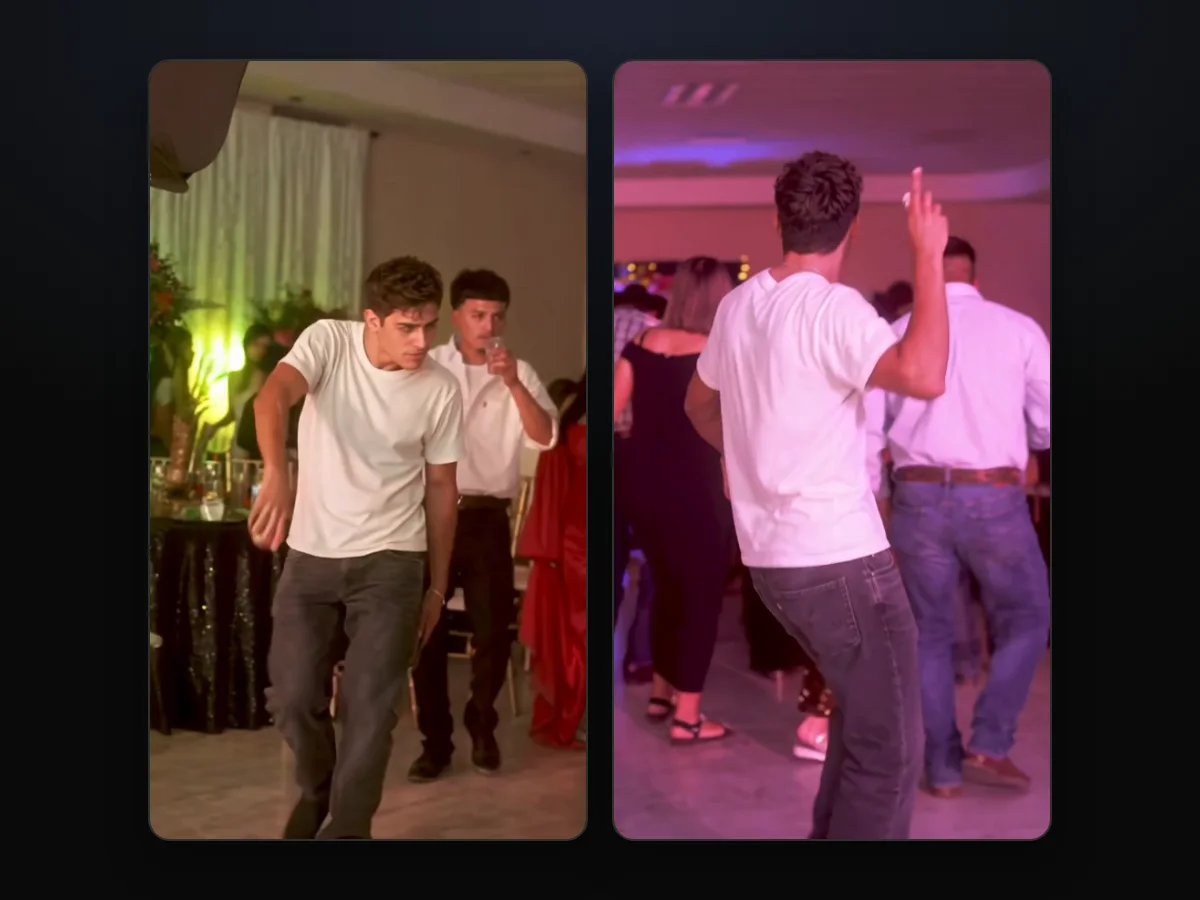
Skip the Dime Dime Baby CapCut Template: One Photo in Your Browser
Our maker doesn't need a template, an app or CapCut credits: you add one photo, pick a quality and tap Create.
- What you add: One clear photo of a person or character facing the camera in good lighting.
- What stays: The original party hall, the guests, the flower centerpieces, the camera path, and the trend's "dime dime baby" sound.
- What it costs: One 720p video uses 500 credits and costs $9.90. You'll see that price on the Create button before you pay, and the pricing page lists every credit pack.
We've put together a walkthrough of the three taps, with screenshots to guide you through it.
If you're exploring other routes, see our breakdown of ten tools that make this video across the web. You can also read the edit prompt itself to see how the dance and bite are instructed step by step.

More Questions About the Dime Dime Baby CapCut Template
Who made the Dime Dime Baby CapCut template?
NiNi9540 created the Spanish-language "dime dime baby" template on October 18, 2026.
How many people have used the Dime Dime Baby CapCut template?
The template reached 262,277 uses by October 21, 2026, after sitting at 106,073 just one day earlier. That's 156,204 more uses in a single day, so the template was still spreading fast when we checked.
How long is the Dime Dime Baby CapCut template video?
The Dime Dime Baby CapCut template runs for 8 seconds, according to the "00:08" length on its CapCut page.
Does the Dime Dime Baby CapCut template add the sound?
The Dime Dime Baby CapCut template's page doesn't list any music. Videos from our maker include the trend's "dime dime baby" sound from the very first frame.
Here's where the dime dime baby line comes from, if you'd like to see how the sound tied into the clip.
Done With the Template? Take the Bby Wow Guy's Spot Instead
The Dime Dime Baby CapCut template stalls across six different steps and swaps out the background for an unfamiliar party. You can skip the downloads and make a Dime Dime Baby AI video right in your browser from one photo. It's $9.90 at 720p.
Written by the Dime Dime Baby AI Team; we read every comment and template page we quote on October 21, 2026.
Related Articles
- How to Make a Dime Dime Baby AI Video Starring You or a Friend — the three taps on one page, from the photo to the MP4
- Dime Dime Baby AI Trend: The Party Clip That Went Viral Twice — the 2025 party clip, the October 2026 AI wave and the dates in between
- Dime Dime Baby Meaning: The Lyric, the Bby Wow Guy and the Meme — what the words mean and every name the meme goes by
- Dime Dime Baby AI Generators Compared: Which Keep the Real Party? — ten tools sorted by what you get back
- Dime Dime Baby AI Prompt Guide: The 260-Word Prompt, Line by Line — the full edit prompt our maker runs, one sentence at a time


